
Lecture 04. Docker Swarm
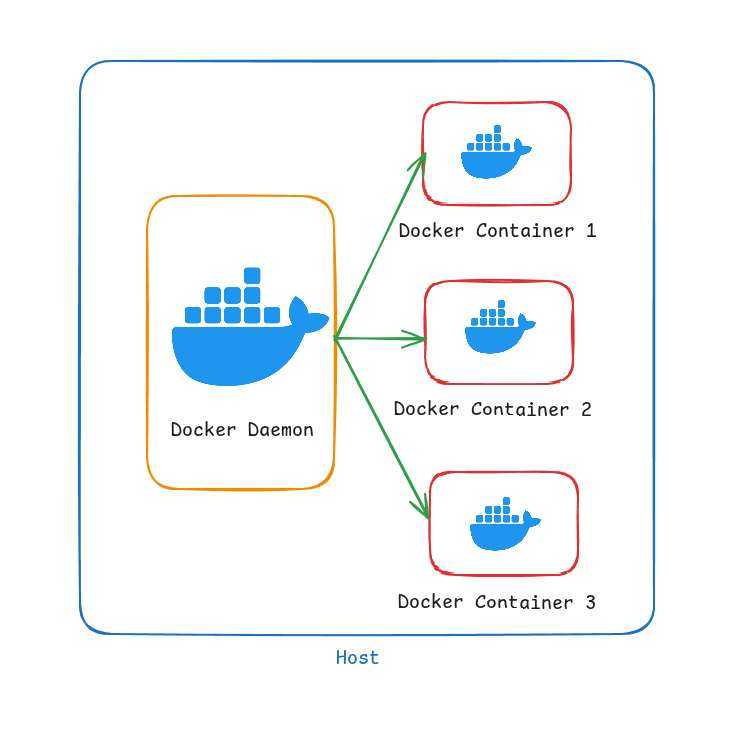
⚠️ Limitations of Standalone Docker Containers
Running a production application using just standalone Docker containers—without orchestration—can lead to several challenges and operational risks:
💥 Single Point of Failure
- If the container crashes due to an application bug, out-of-memory error, or underlying issue, there's no automatic recovery
- The application will remain down until someone manually restarts the container, causing unwanted downtime
📊 Lack of Auto-Scaling
- In standalone mode, Docker does not provide any built-in mechanism to scale horizontally based on CPU, memory, or user demand
- If traffic increases suddenly—such as during a flash sale or peak usage hour—your single container may become overwhelmed and unresponsive
- This leads to degraded performance or complete service unavailability
⚖️ No Load Balancing
- Without orchestration, you typically run a single container instance
- This limits the application's ability to serve multiple users effectively
- If you try to run multiple containers manually, there's no built-in load balancing across them
🖥️ Host Dependency
- If the physical or virtual host machine goes down—whether due to hardware failure, a crash, or maintenance—all containers on that host go down with it
- There's no failover or container migration, which makes high availability difficult
🩺 No Health Check & Auto-Restart Logic
- While Docker does support basic restart policies, it lacks intelligent health monitoring
- If your container is running but the app inside is stuck or returning errors, Docker won't automatically restart it unless it crashes completely
📋 No Centralized Management or Logging
- Managing multiple containers across environments becomes tedious
- You don't get a central dashboard, logging, or monitoring unless you integrate separate tools
- This increases operational complexity
🔄 Manual Networking and Configuration
- Networking between containers must be configured manually, which can become complex in multi-container setups
- Secrets management, config updates, and port management lack the dynamic capabilities provided by orchestrators
Docker Swarm
🌐 Why Do We Need a Container Orchestrator?
While Docker allows us to package and run applications in containers, managing those containers at scale—especially in production—requires much more. That's where container orchestrators like Docker Swarm or Kubernetes come in.
All the limitations of standalone Docker containers discussed previously are solved by introducing a Container Orchestrator:
- ✅ High Availability: No single point of failure
- ✅ Auto-scaling: Adjust to changing workloads
- ✅ Load Balancing: Distribute traffic efficiently
- ✅ Service Discovery: Containers can find each other
- ✅ Rolling Updates: Zero-downtime deployments
- ✅ Health Monitoring: Automatic recovery from failures
📊 Docker Swarm Architecture
Single Manager Architecture
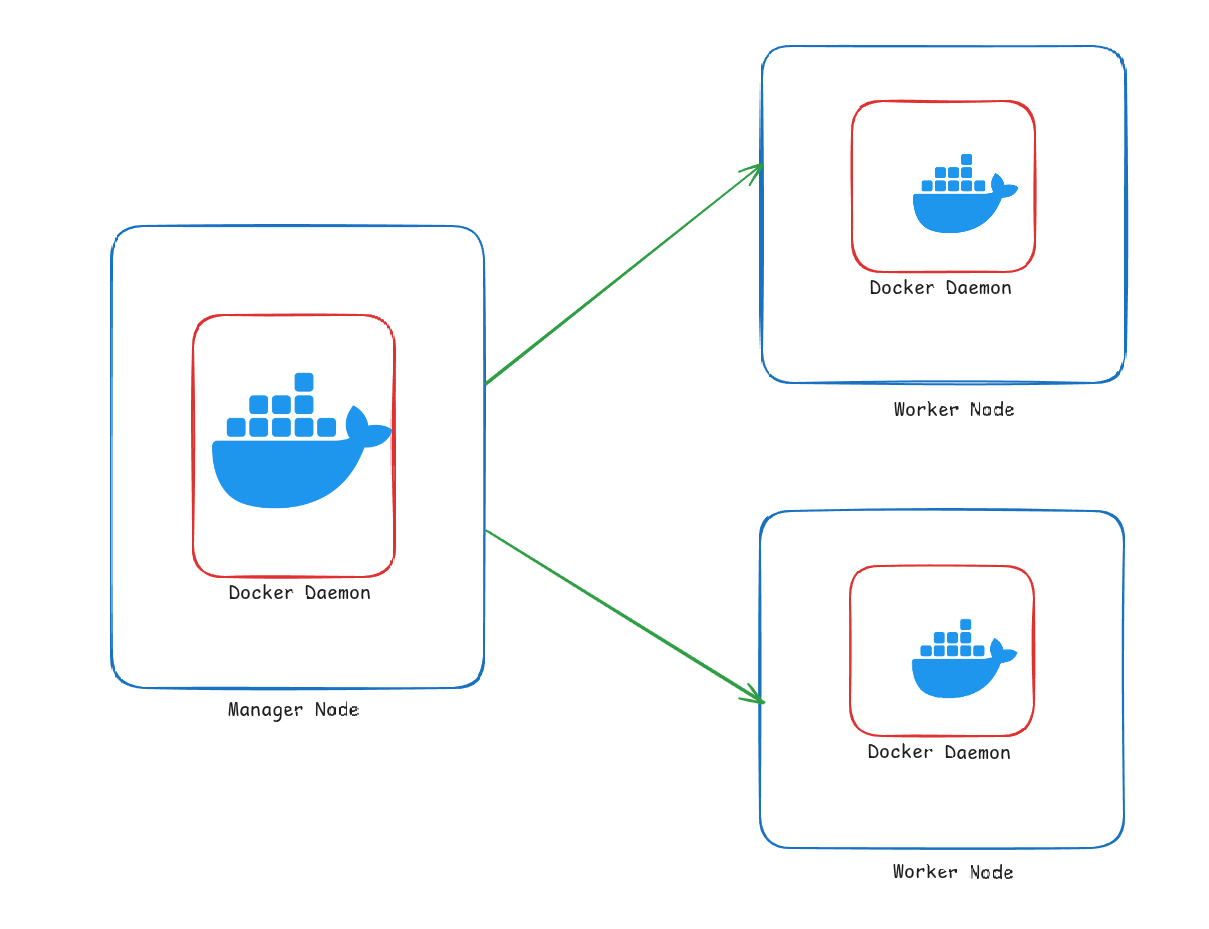
In this setup:
- One manager node controls the entire cluster
- Multiple worker nodes run the actual containers
- Simple but lacks high availability for the manager
Multi-Manager Architecture
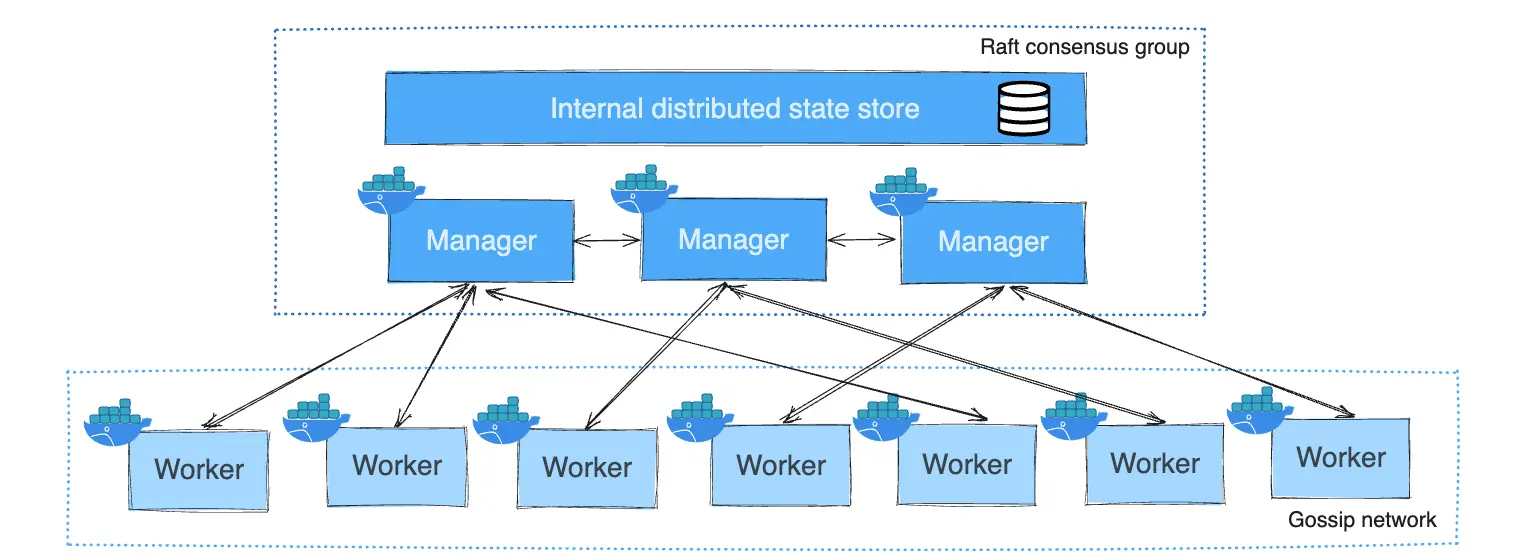
Source: Docker Documentation
In this setup:
- Multiple manager nodes ensure high availability
- Raft consensus algorithm keeps managers in sync
- Worker nodes are distributed across managers
- Provides resilience against manager node failures
🔑 Key Features of Docker Swarm
⚙️ 1. Native Docker Integration
- Uses the same CLI and Docker Compose files you're already familiar with
- No need to learn new tooling—Swarm works seamlessly with the Docker ecosystem
- Minimal learning curve for teams already using Docker
🖥️ 2. Cluster Management
- Turns a group of Docker nodes into a single, virtual Docker engine
- Supports manager and worker node roles for scalability and fault tolerance
- Managers handle the control plane (orchestration and cluster management)
- Workers execute the containers (data plane)
🔁 3. Service-Oriented Deployment
- Applications are deployed as services rather than individual containers
- Each service can have multiple replicas, running across different nodes
- Services are defined declaratively, specifying the desired state
# Example docker-compose.yml for Swarm
version: '3.8'
services:
  web:
    image: nginx:latest
    deploy:
      replicas: 5
      resources:
        limits:
          cpus: '0.5'
          memory: 512M
      restart_policy:
        condition: on-failure
    ports:
      - "80:80"
📦 4. Load Balancing
- Internal load balancer automatically distributes traffic across all active replicas of a service
- Supports both ingress and host networking modes
- Routing mesh ensures requests reach the right service regardless of which node receives the request
🔄 5. Rolling Updates
- Update services with zero downtime using built-in rolling updates
- Can define update policies (e.g., one container at a time)
- Automatic rollback if update fails
# Example rolling update command
docker service update --image nginx:1.21 --update-parallelism 2 --update-delay 20s my_web_service
❤️ 6. Health Checks and Self-Healing
- Automatically restarts failed containers
- Redistributes tasks from failed nodes to healthy ones
- Custom health checks can be defined to monitor application health
# Health check example
healthcheck:
  test: ["CMD", "curl", "-f", "http://localhost"]
  interval: 30s
  timeout: 10s
  retries: 3
  start_period: 40s
🔒 7. Built-in Security
- Mutual TLS encryption between nodes by default
- Secure communication and automatic certificate rotation
- Node join tokens ensure only authorized nodes can join the cluster
📈 8. Auto-Scaling (Manual Triggers)
- While not fully automatic, services can be scaled up/down easily with a single CLI command
- Ideal for predictable workloads
- Can be automated with external monitoring tools
# Scale a service to 10 replicas
docker service scale my_web_service=10
📦 9. Declarative Service Model
- Define the desired state (number of replicas, constraints, etc.)
- Swarm constantly ensures the actual state matches the desired state
- Infrastructure as code approach
🌐 10. Multi-Host Networking
- Swarm mode enables overlay networks that span across multiple hosts
- Containers can communicate securely, regardless of the host they're on
- Multiple network types: overlay, bridge, macvlan, etc.
# Create an overlay network
docker network create --driver overlay my-swarm-network
🔍 11. Simplified Operations
- Easy to set up and manage compared to more complex orchestrators
- Ideal for small-to-medium-sized production deployments
- Perfect for DevOps teams getting started with container orchestration
🚀 Getting Started with Docker Swarm
Initialize a Swarm
# Initialize a new swarm on the current node (becomes manager)
docker swarm init --advertise-addr <MANAGER-IP>
Join Workers to the Swarm
# On worker nodes, run the join command provided by the manager
docker swarm join --token <WORKER-TOKEN> <MANAGER-IP>:2377
Deploy a Stack
# Deploy a stack from a compose file
docker stack deploy -c docker-compose.yml my_application
Manage Services
# List all services
docker service ls

# Inspect a service
docker service inspect my_application_web

# View service logs
docker service logs my_application_web
🔄 Docker Swarm vs Kubernetes
| Feature | Docker Swarm | Kubernetes |
|---|---|---|
| Learning Curve | Low - Simple setup | High - Complex architecture |
| Scalability | Good for small/medium deployments | Excellent for large-scale |
| Community | Smaller | Very large and active |
| Setup Time | Minutes | Hours/Days |
| Auto-scaling | Manual triggers | Automatic based on metrics |
| GUI | Limited (Docker Desktop) | Multiple options (Dashboard, etc.) |
| Cloud Support | Limited | Extensive (AKS, EKS, GKE) |
📚 Conclusion
Docker Swarm provides an excellent entry point into container orchestration with its simplicity and tight Docker integration. While it may not have all the advanced features of Kubernetes, it offers a perfect balance of functionality and ease of use for many production workloads.
Docker Swarm Concepts
Docker Swarm is a native container orchestration tool that allows you to deploy and manage containerized applications across a cluster of Docker nodes with ease. Understanding the core concepts helps you grasp how your application runs inside the Swarm.
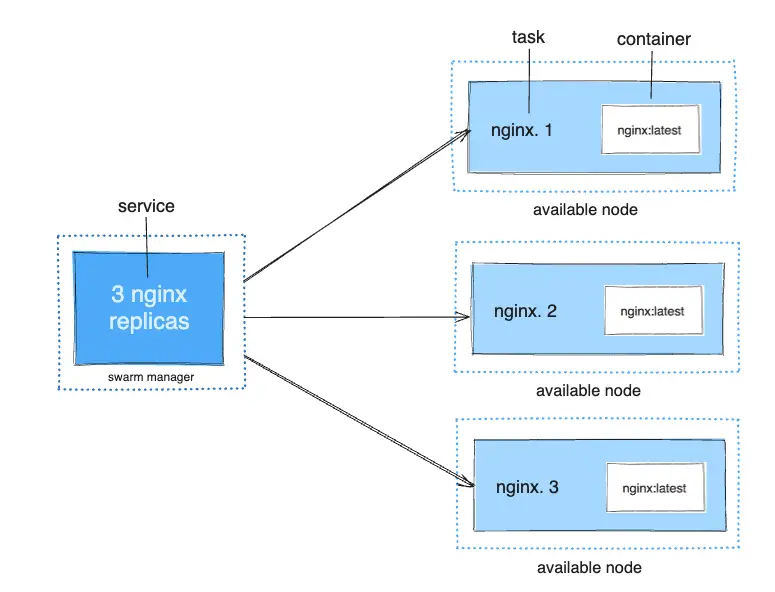
Source: Docker Documentation
📦 Core Concepts
Docker Swarm operates with four key hierarchical components:
1. Container
- The actual running instance of your application image
- Similar to a pod container in Kubernetes
- Executes the application code and its dependencies
- Isolated from other containers but shares the host OS kernel
2. Task
- A Swarm-managed unit of work that runs exactly one container
- The atomic scheduling unit in Swarm
- Has a lifecycle: assigned → prepared → running → complete (or failed)
- If a task fails, the scheduler creates a new task to maintain the desired state
3. Service
- A declarative definition of an application running in the Swarm
- Specifies how many copies (tasks) of a container to run
- Defines the container image, ports, networks, volumes, and resource constraints
- Two service modes:
- Replicated: Run a specified number of replicas across the cluster
- Global: Run one task on every node in the cluster
4. Stack
- A collection of related services deployed together
- Defined by a single Docker Compose file
- Simplifies managing multiple services as a single unit
- Includes networks and volumes required by the services
🔄 Service Deployment Workflow
When you deploy a service to Docker Swarm, the following happens:
- Define Service: You specify the container image, number of replicas, and other parameters
- Service Creation: The Swarm manager accepts the service definition
- Task Scheduling: The scheduler assigns tasks to available worker nodes
- Container Creation: Each worker node creates containers for its assigned tasks
- Service Discovery: The internal DNS registers the service for discovery by other services
- Load Balancing: Incoming requests are distributed across all tasks of the service
📝 Example: Deploying a Web Application
# docker-compose.yml for a web application stack
version: '3.8'

services:
  web:
    image: nginx:latest
    deploy:
      replicas: 3
      update_config:
        parallelism: 1
        delay: 10s
      restart_policy:
        condition: on-failure
    ports:
      - "80:80"
    networks:
      - webnet

  database:
    image: postgres:13
    environment:
      POSTGRES_PASSWORD: example
    volumes:
      - db-data:/var/lib/postgresql/data
    networks:
      - webnet
    deploy:
      placement:
        constraints:
          - "node.role==worker"

networks:
  webnet:

volumes:
  db-data:
🛠️ Common Commands
# Deploy a stack
docker stack deploy -c docker-compose.yml myapp

# List all services in a stack
docker stack services myapp

# Scale a service
docker service scale myapp_web=5

# Update a service
docker service update --image nginx:1.21 myapp_web

# Remove a stack
docker stack rm myapp
🔍 Service Inspection and Troubleshooting
To inspect and troubleshoot services:
# View service details
docker service inspect myapp_web

# View service logs
docker service logs myapp_web

# List tasks for a service
docker service ps myapp_web

# View task logs
docker logs <task-container-id>
Understanding these concepts and commands will help you effectively deploy, manage, and troubleshoot applications on Docker Swarm.
Docker Swarm Hands On
This practical guide will walk you through setting up a Docker Swarm cluster with one manager node and two worker nodes, then deploying and managing services on it.
🎯 Lab Objectives
- Set up a three-node Docker Swarm cluster
- Initialize the Swarm on the manager node
- Join worker nodes to the Swarm
- Deploy and scale services
- Inspect and manage the cluster
🖥️ Lab Environment
For this lab, we'll use three machines (physical, virtual, or cloud instances):
- Manager Node: Controls the Swarm cluster
- Worker Node 1: Runs containerized workloads
- Worker Node 2: Runs containerized workloads
Prerequisites
- Three Linux machines with network connectivity between them
- All machines must be in the same network (e.g., 10.0.0.0/16)
- The following ports must be open between all nodes:
- TCP port 2377 - Cluster management communications
- TCP and UDP port 7946 - Node-to-node communication
- UDP port 4789 - Overlay network traffic
📋 Step 1: Install Docker on All Nodes
Run the following commands on all three nodes:
# Remove any existing Docker installations
sudo apt remove docker docker.io containerd runc

# Update package index
sudo apt update

# Install prerequisites
sudo apt install -y ca-certificates curl gnupg

# Set up Docker's apt repository
sudo install -m 0755 -d /etc/apt/keyrings
curl -fsSL https://download.docker.com/linux/ubuntu/gpg | \
  sudo gpg --dearmor -o /etc/apt/keyrings/docker.gpg
echo \
  "deb [arch=$(dpkg --print-architecture) \
  signed-by=/etc/apt/keyrings/docker.gpg] \
  https://download.docker.com/linux/ubuntu \
  $(lsb_release -cs) stable" | \
  sudo tee /etc/apt/sources.list.d/docker.list > /dev/null

# Install Docker Engine
sudo apt update
sudo apt install -y docker-ce docker-ce-cli containerd.io docker-buildx-plugin

# Add your user to the docker group to run Docker without sudo
sudo groupadd docker
sudo usermod -aG docker $USER

# Apply group changes to current shell session
newgrp docker

# Verify Docker installation
docker --version
docker run hello-world

# IP forwarding for routing mesh
sysctl net.ipv4.ip_forward
sudo sysctl -w net.ipv4.ip_forward=1
🚀 Step 2: Initialize the Swarm on Manager Node
On the manager node only:
# Initialize the swarm with the manager node's IP address
docker swarm init --advertise-addr <MANAGER-IP>

# The output will include a token for worker nodes to join
# Save this token for the next step
The output will look like:
Swarm initialized: current node (dxn1zf6l61qsb1josjja83ngz) is now a manager.

To add a worker to this swarm, run the following command:

    docker swarm join --token SWMTKN-1-49nj1cmql0jkz5s954yi3oex3nedyz0fb0xx14ie39trti4wxv-8vxv8rssmk743ojnwacrr2e7c 192.168.99.100:2377

To add a manager to this swarm, run 'docker swarm join-token manager' and follow the instructions.
🔄 Step 3: Join Worker Nodes to the Swarm
On each worker node, run the join command from the previous step's output:
# Example (use the actual token from your manager node)
docker swarm join --token SWMTKN-1-49nj1cmql0jkz5s954yi3oex3nedyz0fb0xx14ie39trti4wxv-8vxv8rssmk743ojnwacrr2e7c <MANAGER-IP>:2377
The output should confirm:
This node joined a swarm as a worker.🔍 Step 4: Verify the Swarm Cluster
On the manager node:
# List all nodes in the swarm
docker node ls
You should see output similar to:
ID                            HOSTNAME            STATUS    AVAILABILITY    MANAGER STATUS    ENGINE VERSION
dxn1zf6l61qsb1josjja83ngz *  manager             Ready     Active          Leader            20.10.17
yu3hbegvwsdpy9esh4f9fmq7z    worker1             Ready     Active                            20.10.17
ca7a0bxe9gc2hm5kixwz2tgpy    worker2             Ready     Active                            20.10.17
🌐 Step 5: Deploy a Service to the Swarm
On the manager node:
# Create a service with 3 replicas
docker service create --name web-server \
  --replicas 3 \
  --publish 8080:80 \
  nginx:latest
📊 Step 6: Manage and Inspect the Service
On the manager node:
# List all services
docker service ls

# View detailed information about the service
docker service ps web-server

# Scale the service to 5 replicas
docker service scale web-server=5

# Check service logs
docker service logs web-server

# Update the service to a newer image version
docker service update --image nginx:1.21 web-server
🧪 Step 7: Test the Service
Open a web browser and navigate to:
http://<MANAGER-IP>:8080http://<WORKER1-IP>:8080http://<WORKER2-IP>:8080
You should see the Nginx welcome page on all three addresses due to the routing mesh.
🔄 Step 8: Create a Multi-Service Stack
Create a file named docker-compose.yml on the manager node:
version: '3.8'

services:
  web:
    image: nginx:latest
    deploy:
      replicas: 3
      restart_policy:
        condition: on-failure
    ports:
      - "8080:80"
    networks:
      - webnet

  visualizer:
    image: dockersamples/visualizer:latest
    ports:
      - "8081:8080"
    volumes:
      - /var/run/docker.sock:/var/run/docker.sock
    deploy:
      placement:
        constraints: [node.role == manager]
    networks:
      - webnet

networks:
  webnet:
Deploy the stack:
# Deploy the stack
docker stack deploy -c docker-compose.yml myapp

# List all stacks
docker stack ls

# List services in the stack
docker stack services myapp

# List tasks in the stack
docker stack ps myapp
🧹 Step 9: Clean Up (When Finished)
# Remove the stack
docker stack rm myapp

# Remove the service
docker service rm web-server

# Leave the swarm (on worker nodes)
docker swarm leave

# Force leave and remove the swarm (on manager node)
docker swarm leave --force
🎓 Key Takeaways
- Docker Swarm provides native clustering and orchestration for Docker
- The Swarm consists of manager nodes (control plane) and worker nodes (data plane)
- Services are the primary unit of deployment in Swarm
- Swarm's routing mesh ensures services are accessible from any node in the cluster
- Docker Compose files can be used to deploy multi-service applications as stacks